Our AI Roadmap
Where we are, where we're going, and why context is everything
What We'll Cover
A roadmap in four parts
- How AI Works — A quick primer on LLMs, models, and the pieces that matter
- Context — Why it's the single most important factor in AI quality
- Redbud's Context — Our data landscape and how to make it AI-ready
- AI Interfaces — From chat to code to autonomous agents
The Goal
AI-first mindset
- A new way of thinking — this is the most important piece of the puzzle
- AI is not a tool you use occasionally. It's the default lens you apply to every decision
AI-Assisted Team
Not replacing people — amplifying them
How AI Works
A quick primer on the building blocks
The Four Components
What happens when you talk to AI
The Shift
From prompts to context
Then: Prompt Engineering
Carefully crafting the perfect prompt to get good results. Lots of trial and error.
Now: Context Engineering
Give the AI the right information and a simple prompt does the job. Context is everything.
Context
The single most important factor in AI quality
Types of Context
Everything the AI can see
- App context — the environment the AI is in
- System context — constraints added by the provider
- Preferences — custom instructions in your settings
- Memories — things it remembers about you
- Attachments — files added to a chat
- Projects — instructions & files scoped to a project
- Connectors — live links to other tools (MCPs, plugins)
It's a Context Game
What makes context good?
Organized
Structured in a hierarchy, catalogued like a library. The AI can find what it needs quickly.
Accessible
In formats the AI can easily parse — plain text, markdown, CSV, JSON.
Up-to-Date
Not stale. Reflects reality right now, not six months ago.
Context Engineering
Giving AI immediate access to the right information
- Too much context — the AI gets overwhelmed. It condenses, guesses, skips, and misses things
- Stale context — the AI makes decisions based on old information
- Too little context — the AI hallucinates or asks too many questions
The sweet spot
When you have good context, your prompt can be short. The AI already knows what it needs to know.
Context Is Limited
The context window
The total amount of information an AI model can "see" at one time. The entire grid is the window — like the AI's working memory.
Each square is a token — a small piece of text the model uses to understand and generate language. Roughly 100 tokens = 75 words.
Each square = one token. Filled squares = context in use. The whole grid = the context window.
Three Limits to Keep in Mind
Even within the window, quality varies
Token Limit
Absolute maximum amount of tokens.
Binary — fits or doesn't.
Relevance Limit
Models have selective attention, like humans.
Early & late content gets priority.
Noise Limit
Within limits but too messy.
Degrades performance & accuracy.
Great performance requires staying within all three limits: capacity, attention, and cognitive load.
Redbud's Context
Our data landscape and the path to AI-ready
Our Data Is Everywhere
Scattered across platforms
 Notion
 Google Drive
 Google Calendar
 Front / Gmail
 Addepar
 Airtable
 Attio
Attio Slack
SlackAI can connect to all of them — but connecting isn't enough. It doesn't know which tool has the answer, or how our data is organized across them.
The Problem with App-Specific AI
Each tool's AI only sees its own data
Front Copilot
Can draft email responses — but only has access to emails in Front. Missing context from Notion, Drive, Addepar.
Attio "Ask AI"
Can summarize household conversations — but only sees what's in Attio (emails). Missing everything in Notion meeting notes.
 Gemini in Google
Smart in Drive and Gmail — but doesn't know which emails connect to which Drive folders or clients.
Notion AI
Good at drafting within Notion. Can plug into Google Workspace — but unfamiliar with those tools, missing other context.
Even Claude Chat Has Limits
Connecting everything doesn't solve it
Claude Chat can plug into everything via connectors — Notion, Gmail, Calendar, Slack, Attio, Airtable...
But it still doesn't know where to look. Without guidance, it searches randomly or asks you to specify.
The Missing Piece
We need to manage context actively rather than letting the model decide where to look. It's all about engineering the data pipelines.
AI Loves Local Files
The fastest context is on your computer
- Local files are instant — no API calls, no rate limits, no permissions
- AI can read, write, and search them freely
- No proprietary format translation needed
AI's Favorite Formats
What it can parse fastest and most accurately
Text
Markdown
vs. Notion pages, Word docs, Google Docs
Tables
CSV
vs. Excel, Google Sheets
Structured Data
JSON
vs. custom databases
Rethinking Our Data
Structure for AI, not just for humans
- What if AI just had local access to the data it needs?
- Maybe we should prioritize systems that structure data for AI interfaces, not just human interfaces
- E.g., local raw markdown files vs. pretty Notion pages
The Future
Systems that do both — beautiful for humans, structured for AI — are coming. And they'll be easier to build than you think.
AI Interfaces
From chat to code to autonomous agents
Chat Interface
Where most of us start
Claude, ChatGPT, Gemini — the conversational interface.
- Model — you can select which one
- Context — custom instructions, files, memories, connectors
- Input — your prompt in the chat
Best for
Research, drafting, brainstorming, quick questions, analysis with uploaded files
Claude Code
AI with access to your whole computer
Interact through:
- Claude desktop app
- Command line (Terminal / Warp)
- Integrated editors (VS Code, Cursor, Obsidian)
Components:
- Model — select which model
- Context — your entire computer
- Input — your prompt
Claude Code: Tradeoffs
Powerful but constrained
Advantages
- Can engineer context much more dynamically
- Read/write local files, run scripts, automate workflows
- Deep integration with your tools and data
Limitations
- Tied to your computer — can't run when laptop is closed
- Can't run on a recurring schedule (what if your computer is asleep?)
- Not easily shared across the team
- Full computer access raises privacy and security considerations
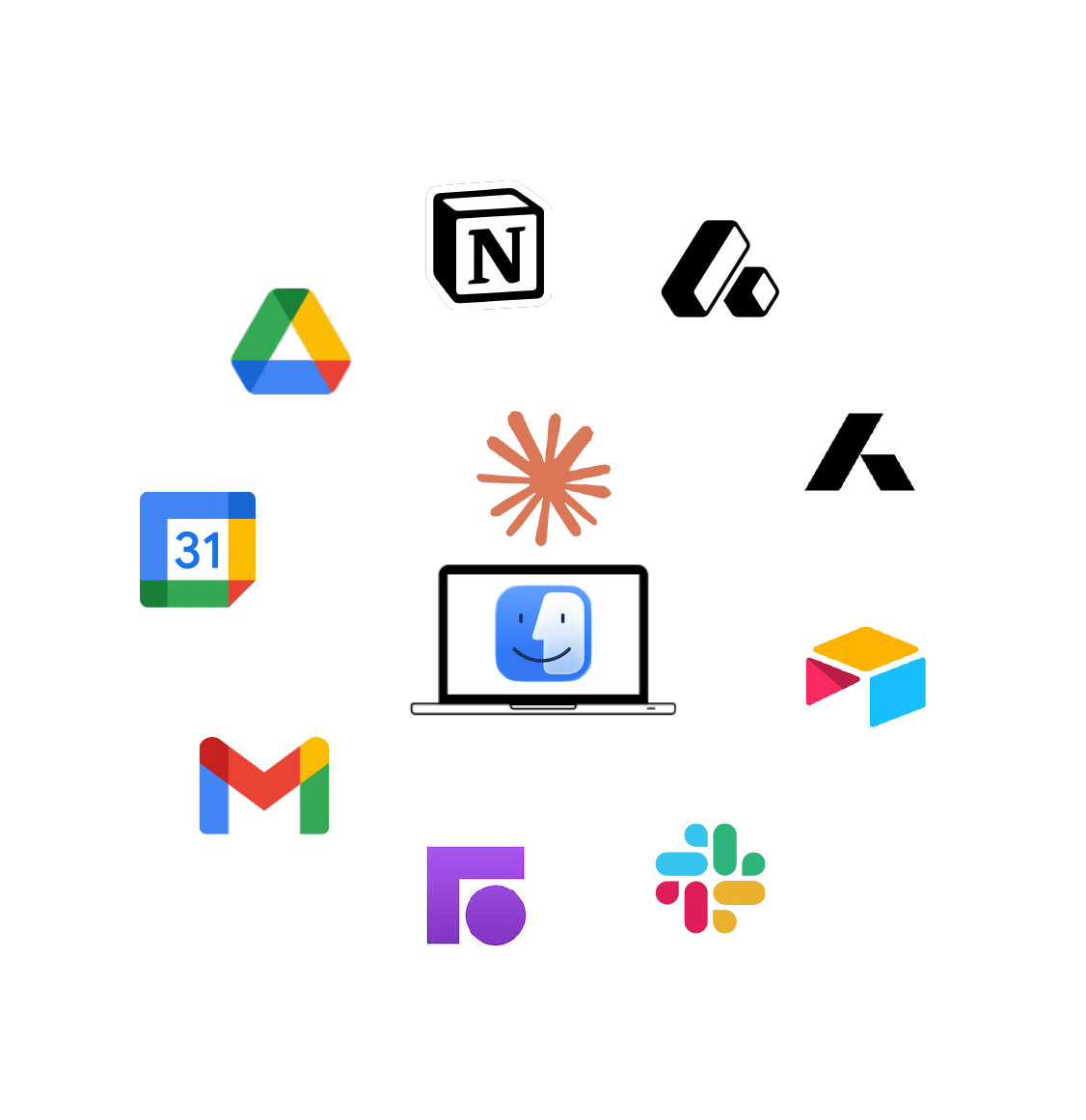
Claude Code + MCPs
Your computer as the hub, connected to everything
What This Looks Like in Practice
Our Claude Code project folder
claude.md
The AI's instruction manual. Who we are, who it is, team roster, tech stack, how to look things up. Loaded automatically every conversation.
commands/
Slash commands anyone can run. /prep-client Smith triggers a full multi-system briefing in seconds.
context/
Organized, accessible, up-to-date markdown files. The AI pulls from these instead of searching blindly across tools.
OpenClaw (ClawdBot)
A self-hosted AI agent platform
- A server-hosted AI agent that runs independently of any team member's computer
- Connects to our tools (Notion, Slack, Gmail, etc.) with its own accounts and credentials
- Can run tasks on demand, on a schedule, or triggered by events — 24/7
- Shared across the team — everyone can trigger it, and it works from a common context
- Built on open-source tooling so we control the stack
Why OpenClaw Matters
The advantages of a dedicated agent
Always On
Runs on a server, not a laptop. Available 24/7, recurring jobs, event-driven triggers.
Privacy & Control
Has its own accounts and credentials. No team member's personal data is exposed. We own the infrastructure.
Shared Access
Any team member can trigger tasks. Common context means consistent results across the firm.
Local Models
Can run AI models locally on the server — faster, cheaper, and fully private for sensitive data.
Performance
Server-grade hardware means faster processing, larger context windows, and more concurrent tasks.
Working with OpenClaw
AI agents as teammates
A Note on Local Models
Running AI on your own hardware
Pros
- Privacy — data never leaves your network
- Cost — no per-token API fees after hardware investment
- Speed — no network latency for simple tasks
- Availability — no rate limits, no outages from providers
- Customization — fine-tune models for our specific use cases
Cons
- Capability gap — local models are still well behind frontier models (Claude, GPT) in reasoning
- Hardware cost — good local inference requires serious GPU investment
- Maintenance — you own the updates, compatibility, and uptime
- Context windows — typically smaller than cloud-hosted models
Where We're Headed
Putting it all together
Key Takeaways
What to remember from today
- AI-first is a mindset, not a tool. Apply it as the default lens to every process and decision
- Context is everything. The quality of AI output is directly proportional to the quality of context it receives
- Our data needs to be AI-ready — organized, accessible, up-to-date, and in formats AI can parse
- App-specific AI is limited. The real power comes from AI that can see across all our tools
- We're building toward autonomous agents that have the context, access, and trust to operate independently
The Progression
Each step builds on the last
More context → More autonomy → More leverage for the team
The End Goal
What we're building toward
Context
Agents have immediate access to the organized, up-to-date context they need to act
Trust
Agents are trusted and secure — with proper credentials, guardrails, and oversight
Collaboration
The team collaborates on shared scripts, commands, and workflows that agents execute
We make the sophisticated simple,
so you can focus on what matters.